Native Windows Performance

Don't type.
Just speak.

Transform your thoughts into perfectly structured text in real-time. EchoWrite lives where you work, handling the formatting so you can focus on the thinking.

Windows 10/11 · Free · No data collection

Featured on There's An AI For That

Talk, don't type

Speaking is 5x faster than your keyboard. Record your ideas at the speed of thought.

Zero Fluff

Instant removal of "umms", "ahhs", and mistakes. Get polished, ready-to-use text every time.

Global Voice

Speak your language, type in theirs. Real-time translation into any app.

Voice Shortcuts

Define your rules. Summarize, format, or style your text with simple voice commands.

Global Integration

Your cursor's new
best friend.

EchoWrite isn't a sandbox. It's a system-wide upgrade. If you can type there, you can speak there. Slack, Notion, VS Code, or your browser — it just works.

One tool. Every language.

Switch languages mid-sentence. EchoWrite detects automatically — no settings, no friction.

🇺🇸🇫🇷🇩🇪🇪🇸🇯🇵🇧🇷🇮🇹🇨🇳🇷🇺🇰🇷🇳🇱🇸🇦🇵🇱🇸🇪🇹🇷🇮🇳🇺🇦🇻🇳🇵🇹🇬🇷🇷🇴🇨🇿🇭🇺🇫🇮+ many more
Intelligence on Demand

Speak messy.
Output Masterpieces.

Transcription is just the beginning. Use Custom Prompts to reshape your raw speech into professional outputs instantly.
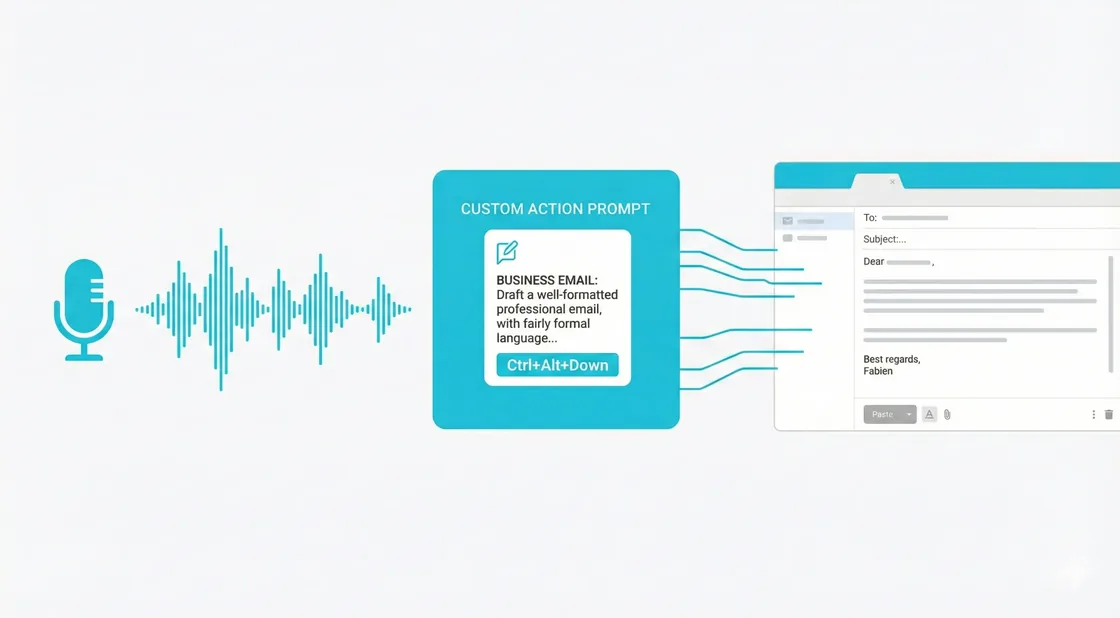
The ArchitectTurn a 5-minute brain dump into a structured Jira ticket or Markdown doc.
The RefinerAutomatically strip filler words while keeping your unique professional tone.
The PolyglotSpeak your native language and have EchoWrite type the translation fluently.
The CoderDictate logic in plain English and watch it appear as clean, formatted code.
Custom Prompt Configuration
Real-time Translation

Break Language Barriers Live

Speak in your language. Type in theirs.

  • Configure a target language once
  • Speak naturally in your native tongue
  • EchoWrite types the translation instantly
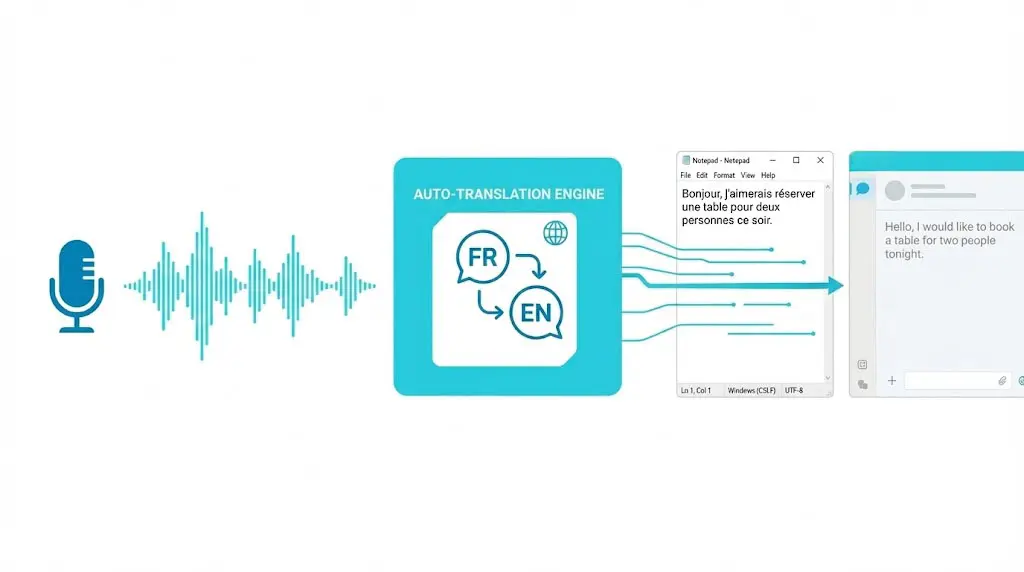
Real-time Translation
Sovereign Data

Cloud Power.
Offline Privacy.

Why trust a third-party server with your ideas? EchoWrite gives you the choice at every step — for both transcription and text processing. Use OpenAI for maximum quality, or download local models and run everything 100% on-device: Whisper for transcription, Llama or Mistral for translation and custom prompts. No internet, no API key, no data leaves your machine.

100% Local
No Cloud Required

From Voice to Text in Three Simple Steps

1

Configure Your Key

Paste your OpenAI API key once — or skip it entirely and use a local model. Your key is encrypted locally. We never see it.

2

Press Global Hotkey

Use the default Ctrl+Space or set your own. EchoWrite listens in the background while you stay focused on your active window.

3

Watch it Type

Release the key. Your audio is transcribed, optionally transformed, and typed out instantly where your cursor is.

"The keyboard is a bottleneck for the mind. EchoWrite removes it."

Built for developers, writers, and thinkers who value their time and their privacy.

Verified reviews

What users are saying

Jordi
Jordi
Mar 5, 2026
★★★★★

At first I had my doubts about using a voice-to-text transcription tool like EchoWrite, but over time I've realized how much it simplifies things. I now write much faster — I've even gotten lazy about using the keyboard! It works wonderfully. Once you learn the keyboard shortcuts, it becomes really useful, and when you use the custom prompts, everything is even simpler. I'm very happy with the experience and I use it more and more. The cost is very low compared to similar tools, and I'm gradually getting the hang of it. If I had to point out something to improve, I'd say that when using custom prompts, the transcription can be a bit slow, and sometimes you're left waiting without knowing whether it's working or not. Also, I've noticed that while transcription is happening, you can't switch screens or do anything else, because if you do, the text is lost. It would be great if this could be optimized. Despite these small details, I still think it's a fantastic tool. It's one step closer to the future — leaving the keyboard behind and starting to interact with computers through voice. It's incredible work, and I truly recommend it. You just have to take the plunge and try it. It's worth it!

Translated from Spanish·
Senjavia Senja
Jwins Tate
Jwins Tate
Mar 3, 2026
★★★★★

Really solid on Windows. I've tried several similar transcription tools before, but this one feels much better integrated into the system. The customizable global shortcuts are a game changer, you can either just do plain transcription or trigger your own custom prompts/actions with different hotkeys. A lot of competitors do roughly the same thing, but EchoWrite stands out because the basic transcription is essentially free (you just need your own OpenAI API key, which costs next to nothing). If you want the custom prompts and translations, it's a one-time payment instead of yet another subscription. In 2026 that's actually pretty fair compared to everything else out there. Big thumbs up.

TAAFTvia There's An AI For That
Mr Abier
Mr Abier
Feb 28, 2026
★★★★★

I'm using the free version just for plain transcription and it does the job very well. I don't really need the extra prompt stuff right now, but the fact that it's a one-time payment if I ever want to upgrade makes me think I probably will at some point. So far it's been reliable. Sure, there are occasional little hiccups with Whisper itself (accents, background noise, etc.), but that's the model, not the app. Every single tool like this is built on Whisper anyway, whether it's OpenAI's cloud version or local. Since this one lets you do unlimited free transcription (modulo API costs if you go cloud), it's hard to complain. For free? Massive yes from me.

TAAFTvia There's An AI For That
SL
Sophie L.
Mar 1, 2026
★★★★☆

This is honestly exactly what I needed. The core transcription works great, and I really love that it gives you proper local Whisper models so you can use it completely offline without any internet. Super useful. I mostly use the custom prompts for emails, like turning my rambling voice notes into clean, professional-sounding messages, and it saves me so much time. Pretty much everyone doing this kind of thing probably uses it the same way lol. Only downside is I really hope they bring it to macOS one day. My main desktop is Windows and it runs perfectly there, but my laptop is a Mac and it would be awesome to have the same workflow when I'm working on that machine. Apart from that, I'm loving it.

TAAFTvia There's An AI For That
Valtiel
ValtielDeveloper
Mar 2, 2026
★★★★★

Am I biased in giving my own tool 5 stars? Frankly, maybe, but I'll tell you why I do it. It's because I originally developed this tool for myself, and I've been using it every day since. It was when I found the tool interesting enough and with enough features that I decided to polish it and share it with everyone. But by being a user of my own tool, I can spot bugs quite quickly, iterate on it, and develop relevant features.

TAAFTvia There's An AI For That
Pay for the software, bring your own key. No monthly AI markups.

Simple, Transparent Pricing

Free Forever

$0no credit card needed
Unlimited Dictation (BYOK)
Local Offline Model
Global Hotkeys
Custom Prompts
Real-time Translation

Yearly License

$57$27per year
Unlimited Dictation (BYOK)
Local / Offline Models
Custom Prompts
Real-time Translation
Global Hotkeys
1 Year of Updates
Best Value

Lifetime License

$67$37one-time payment
Unlimited Dictation (BYOK)
Local / Offline Models
Custom Prompts
Real-time Translation
Global Hotkeys
Lifetime Access & Updates

Your thoughts deserve
better infrastructure.

Stop fighting your keyboard. Start thinking out loud.

Frequently Asked Questions

Why choose EchoWrite over a monthly subscription?

Most apps charge you $20/month to "wrap" an API that costs pennies. EchoWrite is a pro tool: you pay for the software once, and you control your data and costs.

How "local" is the local mode?

Completely. When using local models, EchoWrite functions without an internet connection. Your GPU/CPU handles the heavy lifting, ensuring your data never touches the wire.

Do Custom Prompts and Translation work offline?

Yes — fully. EchoWrite includes built-in local LLMs (Llama 3.2 3B and Mistral 7B) that run entirely on your device. When "Text Processing (AI)" is set to Local, Custom Prompts and Translation work with no internet connection and no API key required. You can also use OpenAI's API for maximum quality — the choice is yours, and both pipelines are configured independently.

Do I need my own OpenAI API Key?

No — but you can. EchoWrite supports both modes. Use your own OpenAI key for maximum accuracy (BYOK), or run a local Whisper model completely offline and free. Your choice.

How much does the API cost?

Incredibly affordable. OpenAI's Whisper API costs $0.006 per minute — over 2 hours of audio for less than $1. For typical daily usage, your monthly bill will likely be just a few cents.

Is my voice data private?

Absolutely. EchoWrite processes your audio locally to prepare it, then sends it directly to OpenAI using your personal key. Your audio and transcriptions never touch our servers.

Does it work on Mac or Linux?

Currently, EchoWrite is built natively for Windows 10 and Windows 11. Mac support is not currently planned.